Here is the instruction show you guide on how to remove and disassemble master cylinder for Yale ERP15-20VT G807 forklift truck.
Related Contents:
Hyster Controllers ETACC UK_139-ETACC 09.2020
How to Upgrade Hyster Forklift ETACC version from 2.4J to 2.4K
Hyster PC Service Tool 2025 2014 v5.5 v4.9 Free Download
Remove:
WARNING
Always wear the proper protective equipment including eye protection and petroleum-resistant gloves when handling Dexron III. Thoroughly wash exposed areas of skin as soon as possible.
CAUTION
Protect the brake system from dirt and contaminants during servicing procedures.
1 Turn the key switch to the OFF position and disconnect the battery.
2 Remove the floor mat and floor plates.
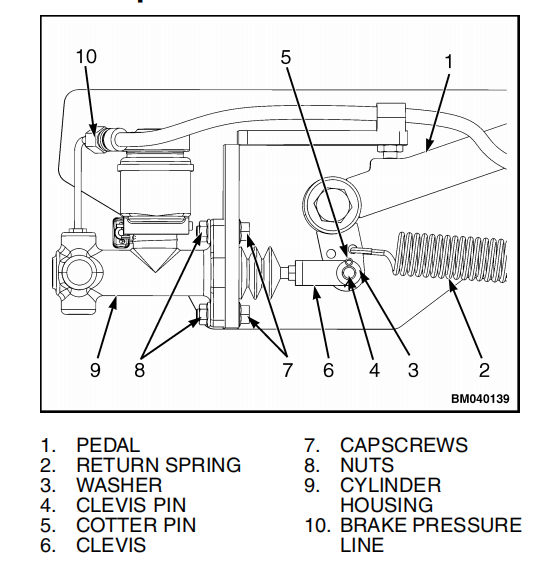
3 Disconnect the brake pressure line from the elbow fitting on top of the master cylinder. Cap hose and fitting to minimize spills and prevent contamination.
4 Disconnect the transducer and the fluid sensor wiring.
5 Pull the cotter pin from the clevis pin and remove the clevis pin and washer connecting the clevis to the pedal. Discard the cotter pin.
6 Remove cap screws and nuts securing master cylinder to bracket.
7 Remove master cylinder from bracket.
DISASSEMBLE
1 Remove master cylinder assembly from the truck.
2 Remove the brake switch by unscrewing it from the cylinder housing. See Figure 8.
3 Remove the elbow fitting from the cylinder housing.
4 Loosen the clamp and remove the reservoir from the cylinder housing.
5 Pull the push rod out of the boot. Remove the boot from the cylinder housing.

6 Loosen the nut and remove the clevis and nut from the push rod if necessary.
7 Remove the retaining ring and extract the piston assembly from the cylinder housing.