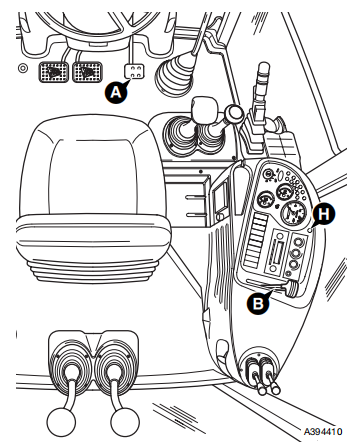
JCB 3CX 4CX Backhoe Loader engine throttle cable is routed from the L.H. side of the engine compartment to connect with the footpedal A at the engine compartment bulkhead, and to the hand throttle lever B housed in the R.H. side console as shown.
Related Contents:
2025 JCB ServiceMaster 4 v25.1.0 Free Download for Win 10 Win11
2017 JCB Parts Plus+ and Repair Service Manual Free Download
Removal
1 Park the machine on firm level ground, apply the parking brake. Lower the loader arms and excavator to the ground, switch OFF the engine and remove the starter key.
2 Open the bonnet and remove the engine side covers.
3 At the L.H. side of the engine compartment, disconnect the throttle cable by loosening the lock nut C and unhooking the cable from the fuel injector pump lever D as shown. Feed the end of the cable back across the engine compartment to the bulkhead on the R.H. side.
4 Working at the R.H. side of the engine compartment at the bulkhead, remove the screws E and ease back the rubber bulkhead cover to reveal the end of the footpedal lever as shown. Remove the nut F and disconnect the cable pivot block from the footpedal.
Loosen the lock nut G and release the cable from the bracket. Feed the cable back underneath the cab to the rear wheel arch on the R.H. side of the machine.
5 Working in the cab, remove the fixing H at the top of the instrument panel and carefully lift the panel forward to reveal the hand throttle lever and mounting bracket assemby J inside the side console as shown.
6 Remove the hand throttle lever knob. Remove the screws K, taking hold of the hand throttle lever
assembly withdraw the handle through the slot in the panel.
7 From inside the side console, carefully pull the cable up into the cab through the aperture in the cab floor.
Replacement
Replacement is the reverse of the removal sequence.
After fitting the cable, operate the hand and foot throttle controls and check that they function correctly
More topics for JCB machine,please refer to:JCB Machine Trouble Repair.