This instruction show you guide on how to remove and install water pump for HINO J05E engine.
Related Contents:
Nexiq USB-Link 3 Diagnostic Adapter
2025.12 HINO Diagnostic Explorer DX3/DX2 Diagnostic Software Free Download
HINO Trucks EPC Electronic Parts Catalog 2018 2016 Free Download
Removing the water pump
1 removing the PCU
Reference: Hybrid, hybrid system,PCU, replacement,
Removing the PCU
2 removing the under cover.
Reference: Hybrid, hybrid system,HV battery,
Replacement, removing the HV battery assembly
3 disconnecting the bottom of PCU
Reference: Hybrid, hybrid system,HV battery,
Replacement, removing the HV battery assembly
4 removing the water pump (1) Disconnect the connector.

(2) Remove the hose clamps (2 pcs.) and disconnect the hoses (2 pcs.).
CAUTION Use a tray or something similar to catch the coolant.
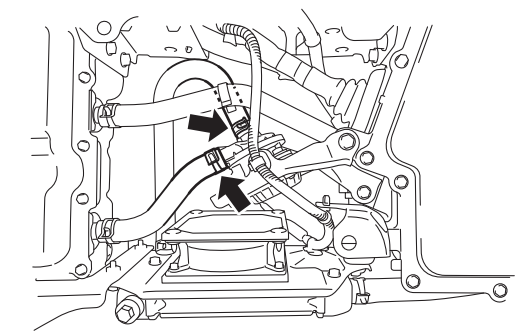
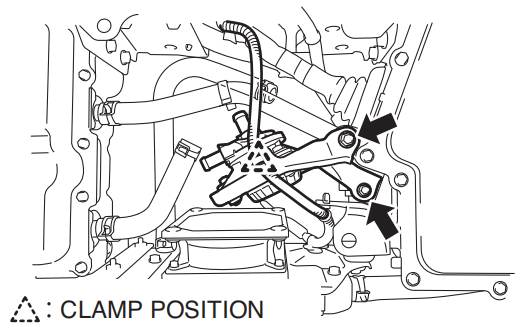
(3) Disconnect the harness clamp.
(4) Unfasten the bolts (2 pcs.) to remove the water pump assembly.
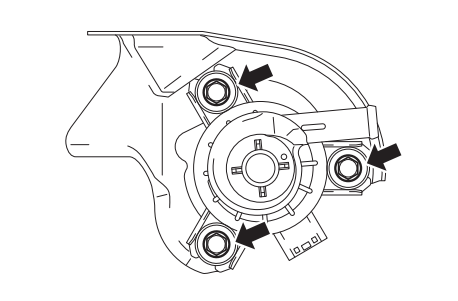
(5) Remove the bolts (3 pcs.) to remove the water pump from the bracket.
Mounting the water pump
1 Mounting the water pump.
(1) mount the water pump to the bracket with bolts (3 pcs.).
Tightening torque:
12.5 n·m {127 kgf·cm, 9.2 lbf·ft}
(2) mount the water pump assembly with the bolts (2 pcs.).
Tightening torque:
19 n·m {194 kgf·cm, 14.0 lbf·ft}
(3) connect the harness clamp
(4) connect the hoses (2 pcs.) and attach the clamps (2 pcs.).
More case for HINO please refer to:HINO Trouble Repair